
Conference Rooms – 4 Tips for More Comfortable Meetings
As many of our clients return to their on-site offices, they are also returning to having in-person meetings in conference rooms. And most conference rooms just aren’t set up to be ergonomic.
That’s why conference rooms are always challenging. They typically include a standard-height working surface – generally, that’s 29” or even 30” – and it’s just too high for most of us. Conference room chairs often lack the adjustability of standard office chairs, thus giving fewer options to achieve a good fit. And then, add a laptop to the mix (and remember, a laptop by itself is never ergonomic – either the screen height or the typing height is correct, but never both).
I’d imagine that something like this may be happening while you’re in these meetings:
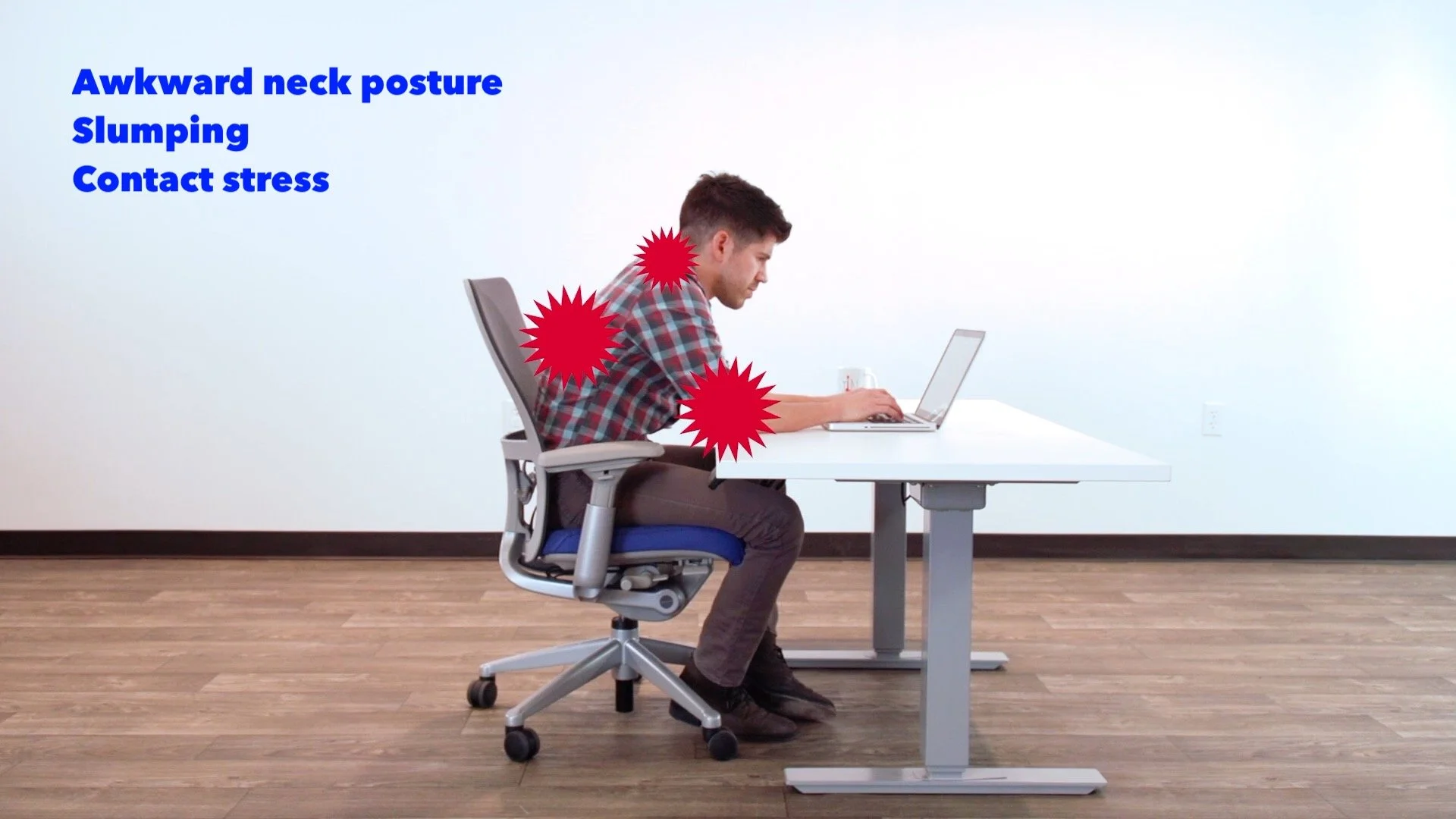
Notice how, in this picture, the neck is bent, the head is coming forward, arms are stretched out, with pressure from the table on the forearms, and the shoulders are being pushed up because of the table height. This can happen to anyone working on a laptop, especially at a surface that’s too high. And the longer you have to maintain this posture, the more uncomfortable it can get.
So what can you do? Here are four tips for more comfortable meetings:
1. Watch your posture.
The body tends to follow the eyes, so working on a laptop will eventually put you into an awkward posture. And reaching up for the laptop keyboard will be hard on your wrists. So stop at least every 20 minutes for a little movement break.
Put your hands into your lap, sit fully supported in your chair, and stretch your neck. Then do a couple of wrist stretches. Next, do any other seated stretches that your body feels like it needs.
Sit back and let your chair support you, with your arms either relaxed at your sides, or resting on the armrests – try not have your hands on your laptop unless you’re actually typing.
2. Bring your travel setup.
I know from experience that people typically don’t like this answer, because who wants to carry around more stuff? And for those 30-minute meetings, it’s probably not necessary, but it could be a life-saver for your neck during those 1-2 hour meetings.
How much ergo gear do you need? Ideally, bring your external keyboard and mouse, along with something to raise the height of your laptop. This can be a laptop stand, or, if there is a bookshelf or printer in the conference room, you could always grab a thick book or a stack of paper to place your laptop on top of.
If you’re not typing or mousing at all during the meetings, then you can forgo the keyboard and mouse, and just bring the laptop stand. However, even if you’re just typing or mousing a little bit, go ahead and bring the full setup.
3. Take a stand-up stretch break.
If you’re in a meeting that lasts more than an hour, encourage the whole group to get up and stretch together at least once.
If you don’t have buy-in from your group, you may need to stand and stretch on your own – but the more that you do this, the more likely it is that someone will eventually join you. I doubt that you’re the only person in the room who feels the urge to stretch during these meetings!
4. If your group is small enough, and no one needs to present or to take notes, then consider a walking meeting.
Not only is this a great way to get away from the typical conference room environment, but you’ll also work some extra movement into your day.
I hope that helps! If you want us to come look at your particular situation, reach out to us and schedule an in-person evaluation. We can assess at you at your desk, as well as provide some tips for your unique conference room situation.